• How to Grow Your Career: 5 Tips to Take Your Skills to the Next Level

    Growing your career doesn’t just happen overnight. It takes time, effort, and dedication — not to mention a lot of patience.

    Career growth takes many employees years to achieve. But the good news is that there are ways you can accelerate the process.

    If you are ready to take your skills and career to the next level, we’ve got you covered with these 5 tips on how to grow your career as a digital marketing professional.

    Even if you feel like you are at a standstill in your current role, these tips will help you accelerate your growth as soon as tomorrow.

    Research and understand your career path

    To start growing your skills, you need to first understand your career path. What is your end goal? What are you working towards?

    If you can answer these questions, you are one step closer to achieving what you want in your career. Knowing your career path will help you create a path to get there.

    Start by researching your company’s organizational chart, or the skills hierarchies for your job title. This will give you a better sense of where you are on the organizational chart and what you need to do to progress.

    You can also use transferable skills to identify areas where you can start growing your skills. This process might feel like a lot of research, but it will be well worth it in the end.

    Knowing where you want to be in your career will help you focus your efforts and make decisions that will help get you there.

    Build your network

    A strong network is one of the most valuable assets you can have in your career. It can help you find new opportunities, get valuable advice, and even find a mentor to guide you along the way.

    It is important to create a solid foundation for your network. This includes finding and connecting with people both inside and outside of your organization.

    Start by doing some research around your organization. Are there any internal networking events or groups you can join to get to know your colleagues better?

    You may also want to consider joining industry-related groups or associations in your field. Playing an active role in your network is just as important as having one.

    Take the time to truly get to know people and what they do. Ask them about their career path, challenges they have faced, and their advice for overcoming them.

    Building relationships takes time, so be patient and persistent in this process.

    Identify a skill you need to develop

    One of the best ways to accelerate your growth is to identify a skill you want to develop. No matter what your current job title is, there are always areas to develop.

    Start with the basics: communication, management, leading others, time management, and critical thinking. You may also want to consider skill areas that are more technical, such as coding or data analysis.

    While these may not be applicable for every digital marketing role, many companies are starting to require data science skills. The best way to identify the skill you want to develop is to take an honest look at yourself and your current skill set.

    What do you excel at? What do you struggle with? What do you wish you could do better?

    Take the lead on new projects

    With so many skills to develop, you may be wondering how you will ever have time to take on new projects.

    However, taking the lead on new projects is a great way to accelerate your growth. Taking the lead on a new project can help you become more comfortable taking on more responsibility.

    It also gives you an opportunity to experiment with new skills. Taking the lead on a project may not be an option at all times, but when it is, make sure to take advantage of it.

    Discovering new opportunities to accelerate your growth, even within your current role, will help you grow your skills faster.

    Commit to growth and take action

    One of the biggest ways you can accelerate your growth is by committing to it and taking action.

    If you want to grow your skills, it’s essential that you make time for it. This could mean scheduling time for reading books or taking online courses outside of work hours.

    Taking the time to learn and develop new skills will help you grow your career and move up the organizational chart. At times, you may feel like you are not making any progress.

    But remember, it takes time to grow new skills. Be patient and don’t give up. As you become more committed to growing your skills and learning new things, you will start to see the results.

    Before you know it, you will be at the level you dreamed of when you started growing your skills.

    Conclusion

    Your career has a lot of potential, and you can grow your career as a digital marketing professional.

    To start growing your skills, you first need to research and understand your career path.

    Next, you need to build your network, identify a skill you want to develop, and take the lean on new projects.

    Finally, you need to commit to growth and take action by exploring new opportunities for growth and learning new things.



  • 5 Tips for Professional Growth: Essential Steps to Take for Professional Coaching

    As a leader, you are always looking for ways to improve yourself as well as your team.

    In this digital age where knowledge is abundant and easily accessible, staying ahead of the curve and learning new skills is easier than ever.

    I want to share with you how you can identify areas of your career that can be improved, offer ideas on how to grow in those areas, and give you some actionable steps to take so that you’ll see improvement in no time.

    I’ve outlined 5 essential steps for professional coaching that will have a positive impact on your professional growth.

    Identify Which Areas of Your Life Require Growth

    Before we dive into the tips, let’s first identify which areas of your life require improvement.

    Keep in mind that professional growth doesn’t have to be limited to your career; it can also include areas such as your relationships, health and wellness, and finances.

    It’s important to remember that you’re more than your job. If you’re feeling stuck in one area of your life, it can have an effect on other areas, so it’s wise to address them all.

    To identify areas of your life that can be improved, take a look at your strengths, weaknesses, and goals. Once you’ve examined these areas, you’ll be able to see where you can improve.

    Build a Culture of Coaching and Mentorship

    One of the best ways for you to grow is to encourage your team members to grow as well.

    By building a culture of coaching and mentorship, you can encourage your team members to learn new skills, grow in their roles, and become better versions of themselves.

    You can accomplish this by setting clear expectations that everyone on the team is responsible for helping each other grow in their roles.

    You can also offer your direct reports the opportunity to choose the coaching and mentorship method that works best for them.

    Some of the most popular coaching and mentorship methods are:

    By setting clear expectations and encouraging your team members to grow, you’ll create a culture that allows everyone to learn and grow.

    Take Time to Learn From Those Around You

    Another great way to grow is by learning from your peers and colleagues. As a leader, you have access to a variety of leaders who can help you grow in your roles.

    You can take advantage of networking opportunities and connect with others who can provide insights and offer advice. This can be done through in-person and online networking as well as attending industry events.

    By building relationships with leaders in your field, you can receive advice on improving in your roles, discover new learning opportunities, and receive feedback on your strengths and areas that can be improved.

    Establish Clear Professional Goals

    Before you can start working towards improving in an area, you first need to identify what you want to achieve. This is where setting clear professional goals comes in.

    When setting goals, it’s important to make sure they are SMART goals: Specific, Measurable, Attainable, Relevant, and Time-bound.

    By setting clear goals, you’ll be able to track your progress and stay accountable for achieving what you’ve set out to do. This is a great way to stay focused on your professional goals and continuously work towards improving.

    Seek Out Information From Trusted Sources

    There are countless resources that can offer advice and tips on how to improve in certain areas of your professional life. You can seek out information from trusted sources by reading books, attending webinars, and subscribing to podcasts.

    By reading books and articles written by thought leaders in your industry, you can gain new insights and discover new ways of improving in your roles.

    By taking advantage of webinars and podcasts, you can learn from experts and gain knowledge from their experiences.

    By seeking out information from trusted sources, you can learn new skills, discover new ways of improving, and stay on top of trends in your industry.

    Conclusion

    There are many benefits of executive coaching, but it’s up to each individual to make the most of it. This article discussed the essential steps of taking advantage of the coaching process.

    By following these steps, you can ensure that you’re getting the most out of your coaching sessions and that you’re applying the lessons you’re learning to your daily life.


  • Finding the Right Executive Coach For You

    Thinking of hiring an executive coach? It’s natural to feel a bit daunted at the thought. After all, coaching is about personal development, and it can be challenging to put yourself on the line in front of someone you don’t know very well.

    How much do you trust this person to keep your secrets? Do you feel comfortable opening up and being vulnerable with them? Are they someone you think will be able to help you see things differently?

    If any or all of these questions make you hesitant, it’s time to find out more about coaching before making that final decision. Executive coaches can be a great asset for leaders looking to take their performance to the next level.

    These professionals bring a completely unbiased perspective into your working life. They are neutral third parties who are focused on helping you grow as an individual by focusing exclusively on your needs as an employee and identifying areas where your current habits may be preventing you from achieving peak performance.

    Why Hire An Executive Coach?

    An executive coach can be a great addition to your team if you feel like you could use some extra support. Before you dive into the hiring process, it can be helpful to know what kind of coaching is out there and what kind of benefits it can bring to the table.

    Here are a few common reasons why people hire an executive coach:

    • Support and accountability when making major changes
    • Whether you’re trying to improve your work habits or make a big career change, having an outside source of accountability and support can be incredibly helpful.
    • A coach can keep you focused on your goals and provide encouragement and motivation every step of the way.
    • A better understanding of yourself and your strengths
    • As you progress in your career and take on new projects and initiatives, it can be easy to lose sight of what makes you unique and special.
    • An executive coach can help you better understand yourself and find ways to bring out your best self at work.
    • A sounding board when you’re facing challenges
    • No one is perfect, and it can be incredibly helpful to have a neutral third party to talk to when you need help figuring out how to deal with a challenging situation.

    An executive coach can act as your sounding board and help you come up with a plan of action.

    How to find the right coach for you

    As with anything in life, there is no one-size-fits-all solution when it comes to hiring an executive coach. Finding the right fit comes down to a combination of factors, including the coach’s expertise and experience, your budget, and how you feel when you speak with a few different coaches.

    If you feel like you need more direction on how to find the right coach for you, here are a few tips to keep in mind:

    • Think about your current needs and goals
    • Before you start looking for coaches, it’s important to get clear on what your needs and goals are. For example, you may be interested in a coach who specializes in helping people make career transitions.

    However, if your goal is to become a better manager in your current job, that same coach might not be the best fit for you. Narrow the search by specialty and functionality.

    Once you’re clear on your goals and needs, the next step is to narrow down your search by specialty and functionality.

    For example, you can search online for coaches who specialize in executive coaching and/or career change coaching. Once you have a list of potential coaches, you can then narrow the search further by functionality.

    In other words, you can focus on coaches who specialize in one particular area, such as assisting with career transitions.

    4 Tips For Finding The Right Coaching Fit

    Once you’ve found a few potential coaches to consider, it’s time to narrow down your search further.

    Here are a few tips for doing just that:

    • Look for coaches who specialize in executive coaching
    • When searching for coaches, make sure to clearly define the type of coaching you’re interested in finding. Many coaches offer a variety of services, but it’s important to find someone who specializes in executive coaching.
    • Consider your budget
    • It’s never easy to talk about money, but it’s important to remember that you get what you pay for. If you go bargain shopping for a coach who charges $100 per hour and doesn’t have much experience, you probably won’t get much value out of the experience. Ideally, you want to work with someone who charges a fair rate and has the appropriate level of experience and education.
    • Consider scheduling parameters and availability.
    • How flexible is the coach? Do you have to work the hours they’re available, or are they willing to be a bit more flexible?
    • Make sure the coaching relationship feels right.
    • When you talk to the coaches on your short list, it’s important to pay attention to how you feel.

    Pay attention to your gut, and don’t rush into a decision just because you’ve found someone who ticks off a few boxes. It’s important to find someone you feel comfortable working with and who you think can help you achieve your goals.

    3 Questions To Ask Before Hiring An Executive Coach

    Once you’ve narrowed down your search and are ready to move forward with interviewing prospective coaches, it can be useful to have a list of questions prepared.

    Not only does this help you clarify your needs and expectations, but it also gives you an opportunity to get a better sense of the coaches you’re considering working with.

    Here are a few questions to ask when interviewing potential coaches:

    • What are your coaching specialties? Make sure the coach is a good fit for your needs.
    • What is your coaching style and approach? Do you prefer a more direct style or are you more comfortable with a coach who is a bit more on the indirect side?
    • What have your past clients said about working with you? Ask for testimonials from past clients, and make sure they are a good fit for your needs.

    Takeaway

    Executive coaching can be a great addition to your professional life, but you have to take the time to find the right coach for you. Start by thinking about your current needs and goals and then narrow your search by specialty and functionality.

    Once you’ve found a few potential coaches, make sure to ask the right questions and get a better sense of the coaches you’re interested in working with. With a bit of preparation, you’re sure to find the right coach for you.


  • Building a Startup Marketing Team: A 10 Step Guide to Hiring Your Dream Team

    In the early days of a startup, you may have to wear many different hats. Depending on your company’s size and needs, marketing tasks may fall on one person or a small group. Whether you’re leading the effort alone or with others, hiring great team members will make your work more efficient and effective. That doesn’t mean it’s easy to find people who are qualified for these roles at a startup. In this blog post, we’ll walk you through the considerations for hiring a marketing team and tips on how to find the right people for your company. These pointers will help you build an amazing team that will take your company to new heights of success.

    What is a Startup Marketing Team?

    A marketing team is the group of people responsible for all marketing activities. Depending on the company’s size, there may be one person in charge of marketing, or multiple. Marketing teams are usually broken into roles based on the type of work being done—whether it’s growth hacking, brand marketing, content creation, or something else. Marketing teams have been around for decades, but they’re especially important for startups, thanks to the broad set of skills required to build the right brand and drive growth. New marketing teams may follow the same type of structure, but even more emphasis on hiring the right people. Startups may be smaller and have a more unique mission and culture than larger companies. This requires you to find people who are a great fit with your company and mission.

    Finding the Right People

    As you’re looking for candidates, keep an eye out for people who are great at their job, but also have a passion for your product. Successful companies are built on culture, so it’s crucial to hire people who align with your brand and mission. These are some of the things to keep in mind as you source candidates: – What qualities can you draw from your current staff? – How do you source candidates? – What tools do you use? – What do the interview process and hiring process look like? – What is your salary and benefits package like? – How do you onboard new hires? – How do you promote from within? These considerations will help you find the right people for your startup marketing team.

    Defining Your Culture

    Before you even start hiring, you must understand your company culture. Every company has a different culture, but there are a few key things to think about as you build yours. – Mission: What do you stand for? What’s the mission of your company? – Core values: What are the values that drive your company? – Personas: Who are your ideal customers? What is the profile of your customers? – Staff type: What type of employees are you looking for? – Staff roles: Beyond job titles, what roles do you need filled? These questions will help you understand the culture you want to build at your company. It will also help you identify candidates who are a great fit with your company culture.

    Decide on Core Roles

    In addition to hiring a marketing team, you’ll also want to decide which roles will be core to your company and which ones will be outsourced to contractors. Marketing is a broad field that covers a lot of areas. Many of them may be outsourced to contractors depending on your company’s budget and other key factors. Here are some core marketing roles that you’ll want to consider hiring for or outsourcing: – Brand marketing: Defining your company’s brand and marketing strategy – Marketing strategy: Creating a marketing plan that ties into your brand – Product marketing: Marketing your product to the right customer base – Sales and marketing alignment: Combining marketing and sales efforts to drive better results – Content marketing: Creating and distributing content that informs and engages customers Depending on the growth stage of your company, you may have to fill all these roles in-house. Once your company is larger and growing quickly, you may choose to outsource these tasks to contractors.

    Assessing Current Staffing

    As you’re looking at candidates, you may want to assess your current staffing needs. You may be hiring new staff members to replace or work alongside your current team members. Here are some questions to ask yourself as you assess your current team members: – What skillsets are lacking on your current staff? – What skillsets do you need to fill? – What role does the person play in the marketing process? These questions will help you understand what skillsets you’re missing on your current team and what skills you need to fill new positions. This will also help you assess candidates and see if they’re a good fit with your company.

    Hiring Recommendations

    Once you’ve identified the key roles you need to fill, it’s time to make a hiring recommendation. There are a few different ways to do this. You may want to write a job description, or you may want to create a marketing roles and requirements spreadsheet. Here are some tips for creating your hiring recommendation: – Start with a job description. – Identify key skills needed. – Outline key responsibilities. – Include a salary and benefits package. – Build a recruitment plan and timeline. The hiring recommendation will help you put together a clear hiring process and make your company more attractive to candidates. It will also help you identify any areas you need to improve on.

    Wrapping Up

    Building a startup marketing team is an important part of growing your company. To do so, you’ll want to know who you need on the team and how you want them to be structured. You’ll also want to know what skills are needed for the team members and how you’ll find them. Once you understand these things, you’ll be able to hire the right people for your startup marketing team. This will help you reach more customers and achieve more growth for your company.


  • My Everyday Carry Tech

    ·

    My Everyday Carry Tech

    I wrote previously about my attempt at finding the perfect setup and after I’ve been using this a few days, I am feeling more confident that this was the right choice.

    It may not be the right choice for everyone, but for me, 99% of my time, I can complete my work whether it’s traveling or my day to day, on four pieces of tech. Just three pieces.

    Let’s get into it.

    ? My Phone

    This year I made the switch to the iPhone 14 Pro Max. I’m not going to go into what is on my phone, but I will go into a little about how I use it.

    The bigger screen has been a huge productivity increase for me. I’ve only had it about a month, but it’s enabled me to pull out other tech less so that I can focus on what I’ve got going.

    Whether it’s taking pictures of my family or checking email, I’ve found this upgrade to be pretty snappy. The added screen real estate has allowed me to use some of my favorite tools like Typefully to schedule some tweets while on the road.

    I’ve also had pretty good luck using it doing a little more journaling on and recording some light videos.

    My iPad

    I have been a long time (2018) user of the iPad and I love it. Recently though, I switched computers for travel back down to a MacBook Air and that’s had me question constantly taking the iPad Pro with me.

    When the iPad Mini was updated to match a similar design to the iPad Pro, I was gifted one (Thanks Jay!) and mainly used it as a reading and entertainment device.

    A few weeks ago though, I decided to test using it as a writing device. I hooked up a bluetooth keyboard to it and immediately started in on my research of writing with it. It worked extremely well.

    With this additional function, it became a necessary tool into my daily tech EDC. I have a cellular version so it’s allowed me to use it wherever I am, and it’s been quite the joy to have.

    I’m getting ready to leave on another work trip and am excited to take it with me (first one in awhile!) as I’ll primarily be using it on the plane and at the airport. That doesn’t mean I won’t necessarily pull out my computer while on the plane (it’s as small at my iPad Pro now) but, I can see a number of uses for my iPad Mini that will be the perfect travel companion.

    My Computer

    I wrote about this in my previous post, but I’ve moved on to a MacBook Air as a regular computer in my life. I have a couple of computers: one for my work (work provides/requires me to use theirs), one for personal, one for a contract gig. My contract and personal computers are both mine, so I can use them interchangeably.

    About a month ago, I decided to spend a little bit of time analyzing the work that I do. I included the workload, apps, websites, everything. I took inventory of length I used them and what I was looking at from an energy use.

    What I found was that I didn’t need the most powerful computer these days. It’s something about the Apple silicon processors or how the apps have gotten easier to use. And the reality is that I’m editing 4k videos regularly or doing livestream. And when I do, I have a computer for that. But I don’t need to use it daily.

    This gave me more data to know that I didn’t need to tug around the most powerful computer that I have. I could take one that’s more portable and still do all my daily (and not so daily) tasks.

    My Headphones

    I never go anywhere without these. I absolutely love my AirPod Pros. They fit in my pocket, get extremely long battery life and of course, connect to all of my other devices.

    I recently upgraded to the new AirPod Pros 2 and they are great. I took them on a flight a few weeks back and I could tell just how much better the active noise cancelling is. I didn’t need to take my AirPods Pro Max unless I wanted to take them.

    I still prefer to use my AirPods Pro Max when I’m in a coffee shop, the office or in a noisy environment, but these can stay at home when I want to pack light.

    Conclusion

    No matter what pieces of tech you use, you have to find out what works for you. It may be something similar to my setup or might be something a bit different.

    I’ve found what works for me and I’ve been super happy with the way things are going.


  • 5 Tips for Setting Goals that Get Achieved

    Setting goals is never more true, than in a startup. In our fast-paced, high-pressure world, it can seem like everyone is setting goals and resolutions. And while that’s great, what isn’t so great is that so many of those goals go unachieved.

    But you don’t have to be a statistic; you can set measurable, achievable goals for yourself quarter after quarter. The key is figuring out how to set goals that actually get achieved.

    It’s not as hard as you think!

    Knowing the right techniques and tricks will make all the difference in the world.

    Here are five tips for setting goals that actually get achieved.

    Set SMART goals

    In order to set goals that actually get achieved, you’ll need to set SMART goals.

    SMART is an acronym that stands for “specific, measurable, attainable, relevant, and time-bound.” If your goals don’t have all of these components, then they’re probably not goals that will get achieved.

    Make sure you write down your goals, and then take a moment to examine each one. Make sure it meets each of these parameters. If it doesn’t, rewrite it. See if you can make it clearer, more precise, and more detailed.

    Your goals need to be as clear as possible so that you know exactly what you’re working towards.

    Turn your goals into a game

    One of the best ways to stay focused on the goals that actually get achieved is to turn them into a game.

    You don’t have to turn them into a competition with other people or anything like that. You can turn them into a game in your own mind. You can make it a challenge for yourself to see if you can meet your goals on time.

    Make it a game to see if you can get more done in a day than you did yesterday. Turn your goals into something fun and challenging, and they’ll seem less like work and more like a game.

    You’ll be less likely to get stressed out, and you’ll have more fun. You’re also more likely to stay focused on the game at hand — which is finishing your goals on time!

    Make sure your why is bigger than your what

    Goals are important, but so is the motivation behind them. Even if you set SMART goals and you are challenging yourself, you may want to consider what your why is. If your why behind them isn’t strong enough, then those goals could fall short.

    Make sure your why is bigger than your what.

    Make sure your why is something you feel strongly about. Make sure your why is something that will keep you going even when the going gets tough. Make sure your why is something that will keep you motivated even when other people’s goals have fizzled out. Make sure your why is strong and powerful enough to keep you going when things get tough!

    Write it down and make a plan

    Another important aspect of goal-setting is writing them down and making a plan. You can’t just set random goals for yourself and expect them to get met. You need to take the time to break down what your goals actually are. You need to sit down and write them out so you can really examine them and make sure they’re the goals you need to be focusing on.

    If a goal isn’t helpful, or if it isn’t getting you closer to where you need to be, then you need to toss it out and start over. As you’re writing down your goals and examining them, you’ll also want to look at what comes next. What are the steps you need to take to achieve these goals? What can you do to set yourself up for success?

    Don’t be afraid to fail — but also don’t be afraid to succeed!

    Even if you think your goals are great, they’re probably not all going to get achieved. That’s just a part of life. You’re not perfect, and neither is your goal-setting process! But that’s okay. That’s normal.

    But don’t be afraid to fail.

    That’s a big part of goal-setting. You’re going to fail. You’re going to fall short of your goals sometimes, and that’s okay! You’re human! Don’t beat yourself up about it. Just take the lessons you learned from failing, and use them to succeed the next time around!

    Don’t be afraid to succeed!

    On the other hand, don’t be afraid to succeed. Setting big, audacious goals for yourself isn’t a bad thing. It’s important to challenge yourself with big, lofty dreams. It’s important to step outside your comfort zone and to challenge yourself to do things you’ve never done before. If you don’t set big goals for yourself, then what’s the point? If you don’t set audacious goals for yourself, then what’s the point? Make sure your goals are SMART, turn them into a game, make sure your why is bigger than your what, write them down and make a plan, and don’t be afraid to fail or succeed!

    Conclusion

    What makes someone successful? Is it talent? Is it luck? Or is there something else? Most people have a vision of their future self. They know what they want to happen in the future, but very few people know how to make it happen.

    Many people don’t realize that setting goals is a crucial step in creating the future you want.

    If you want to succeed, you have to set goals! And if you want your goals to get achieved, then you have to set SMART goals. You also have to turn them into a game, make sure your why is bigger than your what, write them down and make a plan, and don’t be afraid to fail or succeed!


  • Deploying Your WordPress Theme with Github Actions

    I’ve been on a couple of quests recently to use my iPad as my daily driver and to explore FSE theme building..

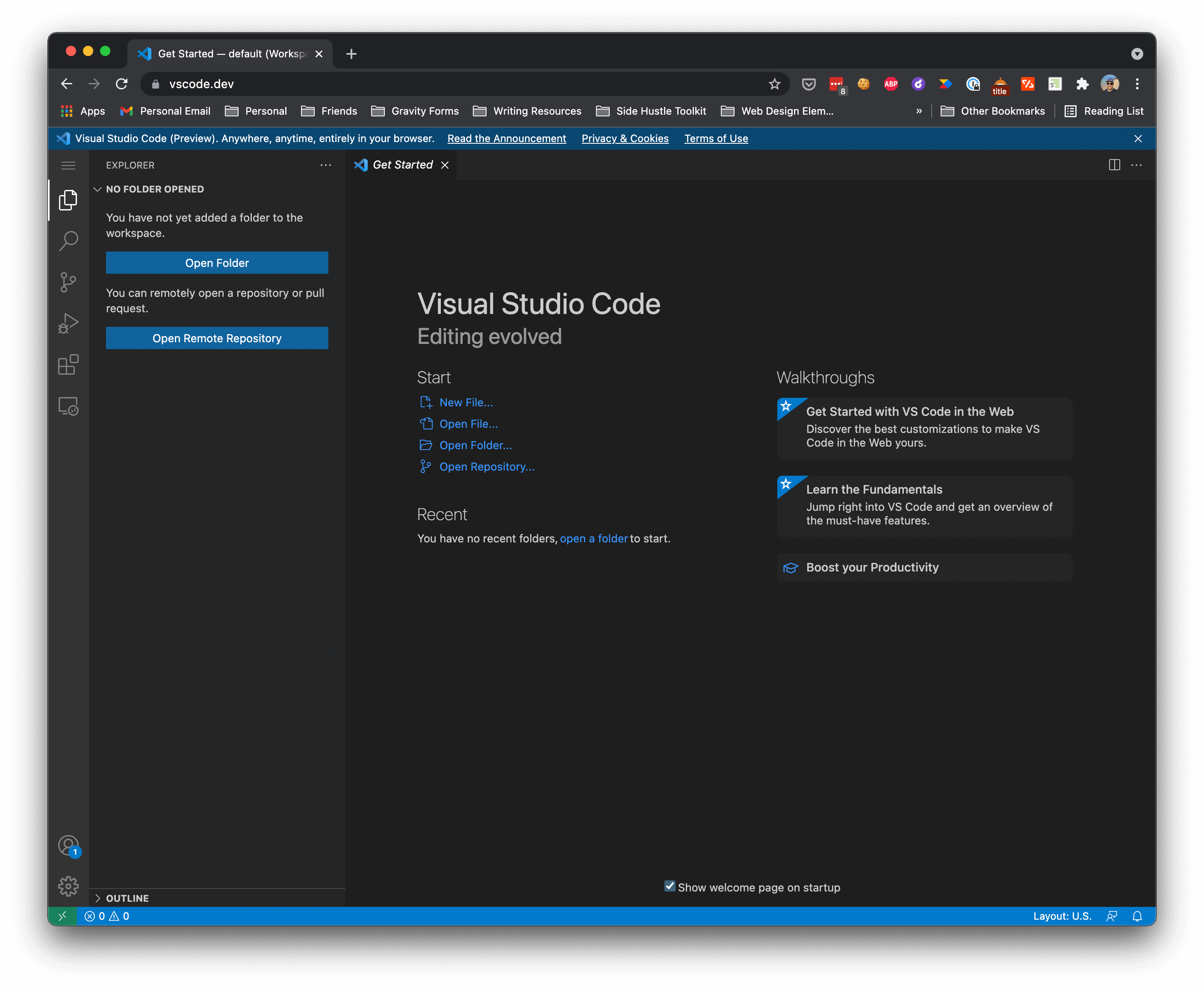
    Both of those quests collided for me as I’ve been having trouble using the code editor apps that are available for iPadOS. Thankfully, the folks over at VSCode/Microsoft/GitHub have made a way for VS Code to work in browser at vscode.dev.

    Want a video version? Here you go!

    Moving to VS Code first

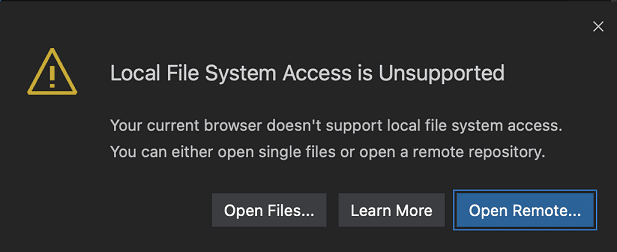
    On my Mac, I love using VS Code, so the thought of being able to use that on the iPad was a no-brainer decision. The only problem? It currently doesn’t support the iPadOS file system.

    I totally get that. It’s a bit complicated and Apple doesn’t seem to allow the type of access I would expect VS Code to need. However, VS Code does work with Github repos, so the in many cases this actually could solve two issues I was encountering.

    The first, being that I was cowboy coding with Code Editor by Panic (no longer available) and saving the files via SFTP on the server. I hated this option, one I didn’t see as being a long-term viable option. But something I was willing to work through as I got myself more accustomed to writing code again and learning the ins and outs of FSE theme building.

    The second issue I was trying to solve was actually around the theme.json file. I was finding issues with Code Editor by Panic not validating the json format. This meant that I was struggling with extra commas or commented-out code that would cause the entire theme.json file to not be loaded by the block editor. I was left trying to troubleshoot what was going on with little to no help from the editor. With VS Code, I expect those issues to be resolved.

    I was quickly able to get up and running with Github and VS Code by adding my theme to version control and then giving VS Code access to that repo.

    The next part was trying to figure out how to automate getting the repo to the server. That’s where Github Actions come in.

    Getting Started with Github Actions

    What I knew of GH actions was pretty simple. It’s basically a way to automate some workflows. So if you are doing any type of CI/CD or building/testing, you can use actions to automate that type of work. But you can also use Actions to deploy your code directly from Github.

    That’s what intrigued me to dig further into it.

    I think it’s worth mentioning that I’m not an expert in any part of this. I am only going to show you what worked for me. It took a little bit of trial and error but got something working that allows me to continue learning FSE theme building, which is what I’m focused on.

    I’m sure there is more that I could do with GH Actions, but for now, I’m getting back into my somewhat familiar comfort zone of learning the theme.json file and new templating structure.

    For my use case, I’m not doing any type of building. I’m literally writing to a few files, including some fonts, and that’s it. I’m not needing to do any type of NPM or submodule process. Just saving files and committing them.

    If that sounds like what you might want to do, follow along. If you are doing more advanced deployments, I’m not sure if this will help you. Maybe it will though.

    Ok. So the first thing you need to do is create an SSH key you can use for deployments. There’s plenty of articles that you can find about how to create this. I ended up doing this on my computer and not my iPad (something I should also blog about at another date). Github actually has a pretty great help article that you can follow along with.

    Once you have your SSH key, you need to add it to your Repo’s Settings.secrets. You can do this by navigating to Settings > Secrets. Add your secret and call it DEPLOY_KEY. You’ll need to use this in your workflow file.

    Alright, with that all set, let’s move to your workflow file. You next need to navigate to Actions on your repo and then choose the option to ”set up a workflow file yourself” instead of choosing one of the options they give you.

    This opens up a new workflow file with some basic information and documentation around it so you are able to start writing a basic script to deploy the files.

    The Script

    I’m going to save you some time without needing to do some google searches. You can definitely look for other scripts and such that might help you along the way.

    But as I mentioned, I wanted something simple. Grab the repo, copy the files to the server. Don’t do anything else.

    I’m including the full workflow file I am using. I’ve made it into a gist for you so you could copy it into yours. I’ve tried to make the necessary comments inline of the script, so you can replace as you see fit.

    Wrapping Up

    Once you save your workflow file, Github will run your first action. You will want to make sure that your theme is not on the server (I forgot about that the first time) and that the SSH key is on the server so it will log in correctly.

    Assuming those two things are good, you should be off to the races and able to deploy your WordPress theme to your site every time you push to your main or master branch.


  • Failing To Get Started with the Theme.json

    Alright.. Honest truth time. I failed at about everything I tried today to get started with the Theme.json file. So much so, that you wouldn’t want to watch a video of me fumbling through documentation, etc.

    I think that says a lot about the level of documentation that’s still needed for the average user. At one time I had about 50 links open and still couldn’t figure out what was going on.

    Where did I fail?

    I’m glad you’ve asked! I understand the purpose of the theme.json but as I got started out, I wanted to start taking a look at some of the structural elements like contentWidth and wideWidth. But those immediately didn’t work, or at least what I was expecting.

    It was well defined, what the layout should do with regards to the block editor view, but it didn’t work. Now I was using Gutenberg 11.6 and from what I was reading. In fact, it seems that it’s supposed to be fixed.

    So let’s move past that and over to the next. I decided that since I couldn’t get the layout settings working, I moved towards padding and margin.

    Surprise!

    When I added that, it too, didn’t work as I thought it was. I’m not sure why because I haven’t been able to find anything that says where to look or what to see.

    Building with Gutenberg

    It is without a doubt that Gutenberg is in full development mode. Because of this, it feels like it’s constant changing and documentation is lacking quite a bit.

    This is fully expected to be the case when you are working with cutting-edge technology. I want to make it clear, that I’m not casting blame or upset by any of this.

    It turned out to be a good experiment in trying to figure this out in a way that would allow me to use this brand new, still experimental work.

    Wrapping Up

    I think I need to enlist some help to get me going on the theme.json file. Have you had a chance to play with it yourself? Do you have some updated documentation, a specific video recommendation, I should watch/read? Please shoot them over. Hit me up to Twitter to continue the conversation.

    In the meantime, I’m going to continue to do some research and see what I can find to address some of my issues. With any luck, I’ll be back on this journey in just a few days. I’ve got faith that this is the future of WordPress themes and I’m still ever more excited to get into it.


  • Creating a Full-Site Editing Theme

    Today is the day.. I’m chronicling my journey through creating a full-site editing theme. I’m going to be writing out my experience here, but if you’d rather go through it on video, I’m going through that way as well.

    I’m really excited about this. I think WordPress theme building is going to be a lot easier. You’ll be able to build WordPress themes without actually needing to know as much code as you used to when you were building classic themes.

    But what does it really look like? Is there a lot that we can learn from what this looks like. I’m ready to dive in.

    Before we dive in though, I should mention a couple of house cleaning items.

    I will be doing all of this work on my iPad Pro. Which means I do not have typical access to a local development server like Local by Flywheel.

    I’m going to be doing this work on a staging server and SFTP/SSHing into the server to create all the files. This means that it goes against my best practices, but since this is really just about the code itself, I’m going to let this slide.

    Video Tutorial

    If you want to see everything visually and get a little more detail into the how and the why of this tutorial, I encourage you to check out the video version.

    Minimum Requirements of a WordPress Theme

    Alright to get us started with this we need to create 3 things on our server.

    1. A theme folder
    2. In is an index.php file
    3. A style.css file

    WordPress really just needs to two files in order to understand that it’s a WordPress theme.

    In the style.css file, you will need to use a header block, basically consisting of some information to let WordPress know it’s a theme. I’ve copied that below so you have an easy place to grab it.

    /*
    Theme Name: Twenty Thirteen
    Theme URI: http://wordpress.org/themes/twentythirteen
    Author: the WordPress team
    Author URI: http://wordpress.org/
    Description: The 2013 theme for WordPress takes us back to the blog, featuring a full range of post formats, each displayed beautifully in their own unique way. Design details abound, starting with a vibrant color scheme and matching header images, beautiful typography and icons, and a flexible layout that looks great on any device, big or small.
    Version: 1.0
    License: GNU General Public License v2 or later
    License URI: http://www.gnu.org/licenses/gpl-2.0.html
    Tags: black, brown, orange, tan, white, yellow, light, one-column, two-columns, right-sidebar, flexible-width, custom-header, custom-menu, editor-style, featured-images, microformats, post-formats, rtl-language-support, sticky-post, translation-ready
    Text Domain: twentythirteen
    
    This theme, like WordPress, is licensed under the GPL.
    Use it to make something cool, have fun, and share what you've learned with others.
    */

    Make sure that you replace what’s appropriate with your own information. Save that file and then let’s go ahead and create the index.php file.

    In the index.php file we’ll just put this in there.

    <?php
    // silence is golden.
    

    Save that as well and then we should be good. Go back into your browser, reload your page and you should see that you have your theme listed. I’ve gone ahead and even activated mine, so you can see that in the image below.

    Ok. We’re good really well. We’ve got WordPress seeing our theme and now we need to get the Full-Site editing portion working.

    Full-Site Editing

    Now that we’ve got our theme working with WordPress, it’s time to get the FSE side of it working.

    To do that, we need to add 2 items to our server.

    1. We need to add a folder called ’block-templates’
    2. We need to add an index.html file inside the ‘block-templates’ folder.

    With these two things in our theme folder, we should see the Site Editor menu item on the left of the WordPress Admin menu.

    Once you see the Site Editor menu item, you are in the home stretch.

    Wrapping Up

    That’s everything you need to get the Full-Site Editing features running with your WordPress theme. In the next post and video, we’ll take a look at the Theme.json file and start looking at further customization options you have there.

    Make sure you subscribe to my list to get these directly in your inbox. And maybe head on over to YouTube and subscribe to my new channel there, too.


  • WordPress Theme Development is Changing

    When I first started bufilding WordPress themes, was fairly simple. As long as you had some basic HTML and CSS skills, you could quickly transfer that into PHP and you could have a theme in no time.

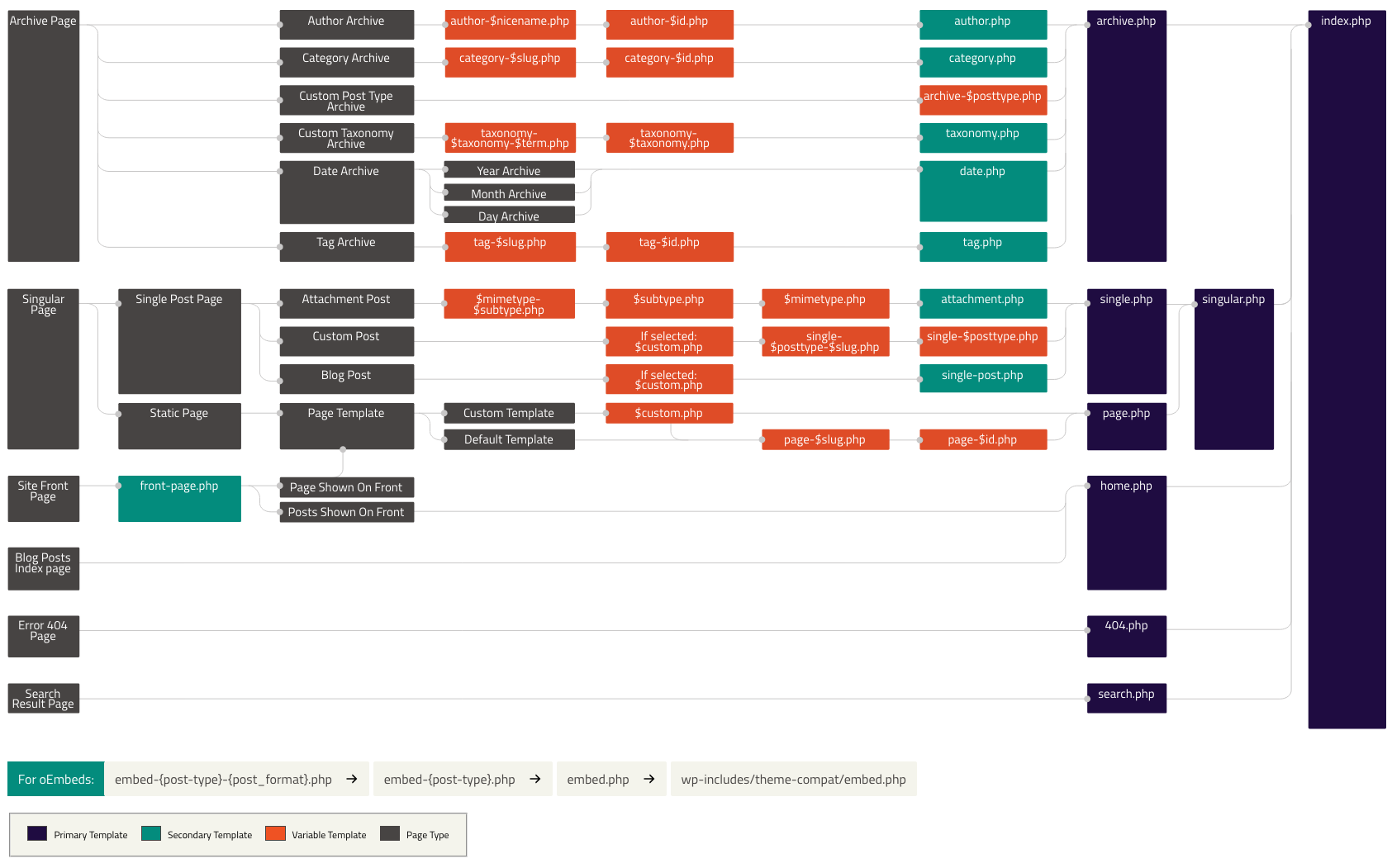
    I remember building my first theme. I used the WordPress theme hierarchy as my digital map of what templates I needed to use and how to build theme.

    WordPress Theme Hierarchy

    I used this for years until I found builder style themes. A long time Headway Theme’s user, I found that I could build websites quicker when I used these early page builder themes.

    Fast forward to the last 5 years, we’ve seen a lot of advancement in page builder themes. Elementor, Beaver Builder, and now Gutenberg have all built quite the following.

    For the last 5 years or so, I have been a longtime Beaver Builder user. I still use it for a number of client sites, but the last couple of years, I’ve moved towards the WordPress Block Editor (Gutenberg) for my personal projects and some lite projects that don’t require a lot of customization.

    Full Site Editing

    Earlier this year, WordPress 5.8 was released and is the first phase of the FSE releases. The biggest feature is that WordPress 5.8 now works with theme.json files. I’ve been playing around with a little and it looks very promising.

    It might even make theme building fun again.

    That’s not to say that I don’t have a couple of themes I like to use. I love GeneratePress and Kadence. They are my absolute favorite. In fact, combine them with their own block plugins, and they are super powerful.

    But at the end of the day, they are another page builder tool in my toolbox. Just like Beaver Builder, Beaver Themer and Astra, GeneratePress and Kadence work well when they are paired with their block plugins.

    These are great no-code tools and when I need something fast like others, I have my go-to. They are still there and will still be in my toolbox for other projects I’ve got going.

    For my personal site though, it’s really been my playground of sorts. It’s a place that allows me to experiment with ideas (writing and code), new products, more. It’s the one site that I can always work on and continually build.

    I’m excited to start building a theme from scratch again. Especially with the FSE theme to see what you can do with no-code (or low code) as a result.

    But I do wonder what the development costs are associated with it. Will someone that knows some HTML, CSS and maybe a little PHP be enough to build a FSE theme? How does that work with child themes? What about templates?

    I have a lot of questions I would like to see get answered as I dive into what building a FSE theme looks like.

    And for the next 30 days, I want to bring you along on the ride. I want to share with you what it looks like to build a FSE theme from scratch. Not just a theme that doesn’t look good. I want to build a FSE theme for myself. To launch the next version of my personal site.

    If you are interested in this, I urge you to join my newsletter. You’ll get each of these posts sent to you daily. You can sign up at the end of this post.

    A couple of helpful concepts I think are worth mentioning with this experience. I’m going to record a 5-10 minute video each day as I play around with a specific challenge I’m working through. I’ll also be blogging about it.

    If you are following along with this as I go, you’ll be able to see the test site as I’m going to run this on a subdomain while I blog over here. In fact, I’m taking this challenge a little further, in that I am going to be building this completely on my iPad.

    Might as well go big if I’m going to do it. Are you ready? See you tomorrow as I jump into this head first!